Electric mobility devices often reveal trouble through small, repeatable clues: a dim battery display, a hesitant start, or a charger that stays cool. Good diagnosis begins with observation, not guesswork. Note when the problem appears, the battery level, recent charging, and any warning lights. Those details can help a qualified technician distinguish a depleted battery from a loose connection, worn tire, or control-system fault. A single symptom rarely tells the whole story.
For this guide, mobility service specialist Jordan Lee offers a practical rule: “Check the simple signs, record what changes, and stop when a test could put someone at risk.” That is a useful mindset for anyone learning how to troubleshoot issues in electric mobility devices. Park the device on a stable surface, consult its manual, and inspect visible cables for damage without opening sealed components. Never bypass a safety feature. Small details matter.
The sections ahead explain how to check power, charging, controls, and common mechanical symptoms in a sensible order. They also clarify when a problem calls for professional service. A reset may clear a temporary fault, but it cannot repair a failing battery or damaged wiring. It is easy to blame the charger too quickly; I have to admit, that shortcut can miss the real cause. Careful notes, safe checks, and honest limits make troubleshooting more reliable.
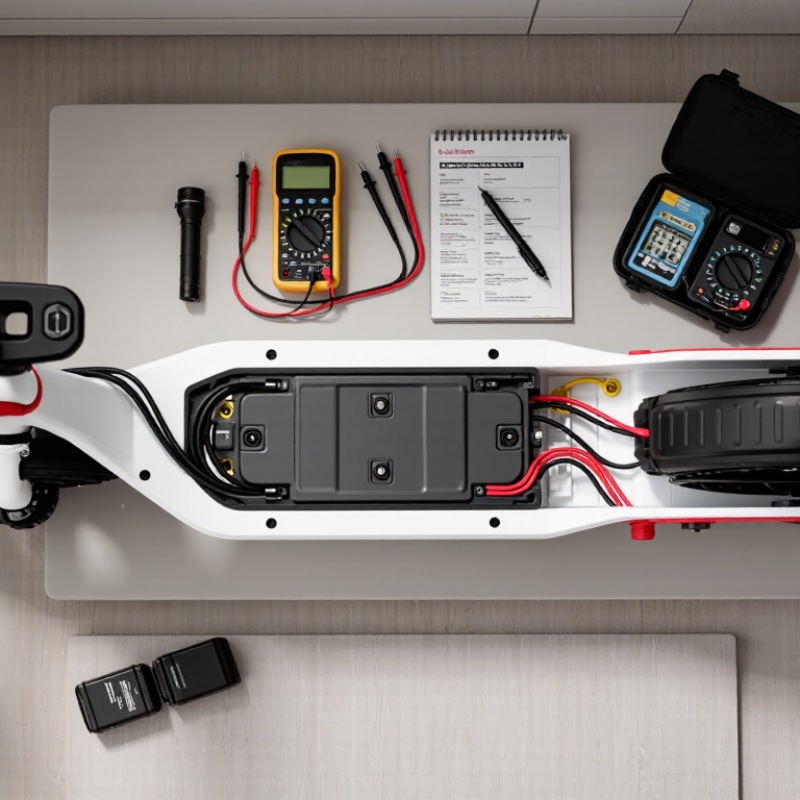
Troubleshooting electric mobility starts with naming the symptom, not guessing at the failed part. Does the vehicle refuse to charge, lose range, display a warning, or feel unusually slow? Record when it happens, the battery level, weather, and any recent changes. The International Energy Agency reported nearly 4 million public charging points worldwide in 2023, up about 40% from 2022. More charging access also means more chances to encounter connector, payment, or station faults. Small clues matter.
For a charging problem, check whether the connector is fully seated and whether the station shows an error. Try another compatible charger if it is safe and practical. If charging works elsewhere, the original station or cable may be the issue. If it fails across several stations, note the dashboard message and arrange a qualified inspection. For reduced range, compare similar trips and temperatures; one short journey is weak evidence. Watch for sudden drops, repeated shutdowns, or unusual heat. Do not ignore those signs.
Cold weather can imitate a battery fault. In a 2019 test, the American Automobile Association found that an electric vehicle’s range fell by about 41% at 20°F when cabin heat was used. That figure is test-specific, not a prediction for every vehicle. It is easy to overread one warning light, though. Photograph the display and keep a simple symptom log before resetting anything; missing details can make diagnosis harder.
Before troubleshooting an electric scooter, bicycle, or wheelchair, pause and scan for immediate danger. Look for smoke, a hot or swollen battery, leaking fluid, damaged wiring, or a sharp chemical smell. Listen for hissing or crackling, too. These signs mean stop. Do not ride, charge, open, or handle a suspect battery. Keep people away; if it smokes or catches fire, leave the area and call emergency services. Disconnect power only if the plug is cool, undamaged, and safely reachable.
The risk is not theoretical. The New York City Fire Department recorded 268 lithium-ion battery fires, 18 deaths, and 150 injuries in 2023. Those figures cover the city, not every electric-mobility device, but they underline why safety comes before diagnosis. A warm charger can be normal; a battery that grows hotter, swells, or smells unusual is not a routine fault. I would rather pause over a false alarm than investigate beside a failing pack.
Once the area is safe, check the user manual and inspect visible cables without removing covers. Note what happened just before the problem: rain, a hard impact, a sudden loss of power, or unusual charging behavior. Don’t guess at battery repairs. A checklist can still miss something, so stop and seek qualified service when the cause is unclear.
When an electric mobility device loses range, slows unexpectedly, or will not start, begin with the battery. Check its charge indicator, then look for swelling, cracks, unusual heat, or a chemical smell. Stop using it if you notice any of these signs. Don’t open the battery casing; internal cells can remain hazardous even when the device is switched off. A low reading may also reflect a loose connection rather than a worn battery, so note when the problem occurs.
Inspect the charger next. Unplug it before checking the cable, plug, and charging port for bent pins, fraying, dirt, or discoloration. Keep the port dry, and use a soft, dry brush for loose debris. A charger that stays unusually hot or produces a burnt odor needs professional attention. Simple checks help, but they are not a diagnosis.
Finally, examine accessible electrical connections with the device powered down. Look for plugs that have worked loose, pinched wires, or corrosion near exposed contacts. Don’t tug on cables or bridge terminals to test them. I’ve found that intermittent faults can disappear during a quick inspection, which is frustrating; record when they happen and what the battery indicator shows. If the issue persists, have a qualified technician test the system.
What Is the Best Way to Troubleshoot Electric Mobility?
Test the Controls, Motor, and Related Systems
Start with the controls, before blaming the motor. With the vehicle safely parked, check the display, brake interlock, throttle response, and mode selection. Note warning lights and record any diagnostic codes before clearing them. A control may appear faulty when a loose connector or weak low-voltage supply is the real cause. Small clues matter. A dashboard warning is useful, but it rarely identifies the failed part by itself.
Next, check for unusual motor noise, vibration, or heat during a controlled test. Compare symptoms with diagnostic readings, such as supply voltage and motor-temperature data; never open high-voltage components unless qualified. The U.S. Department of Energy reports that electric vehicles convert over 77% of grid electricity into power at the wheels (“Where the Energy Goes: Electric Cars”). That efficiency depends on the motor and its supporting systems working properly. Inspect related wiring, battery connections, inverter alerts, and mechanical drag from brakes or wheel bearings. A single test rarely tells the whole story. Retest after each repair, and document what changed; it is easy to mistake a symptom for a cause.
| System or check | Common symptom | Safe troubleshooting steps | What the result may indicate | Next action |
|---|---|---|---|---|
| Power and battery | Device will not power on, shuts down, or shows a low-battery warning. | Confirm the charger is disconnected before use. Check the charge indicator, battery seating, and accessible cables for looseness or visible damage. Follow the device manual for battery checks. | A low charge, poor connection, aging battery, or battery-management fault may be responsible. | Charge with the specified charger. If the warning persists, have the battery and power circuit tested by a qualified technician. |
| Controller and display | Display is blank, controls do not respond, or an error code appears. | Check that the device is switched on and that the display and control connectors look secure. Record any error code before restarting; consult the manual for its meaning. | The issue may involve a loose connector, control input, wiring, or controller fault. | Restart only as directed by the manual. Do not bypass safety interlocks; seek service if the code returns or controls remain unresponsive. |
| Throttle, joystick, or speed control | Movement is delayed, uneven, or absent, or the device moves unexpectedly. | With the device safely stationary and powered off, check for sticking, obstruction, or visible damage. Confirm the control returns to its neutral position without forcing it. | A sticking control, damaged sensor, poor connection, or controller problem may be present. | Do not ride or operate the device if the control sticks or causes unintended movement. Arrange a qualified inspection. |
| Motor and drive system | Motor does not turn, makes unusual noise, or loses power under load. | Power off the device. Check accessible motor cables and drive components for visible damage, debris, or obstruction. Do not open the motor or controller housing. | Possible causes include a disconnected cable, mechanical obstruction, overheating, or a motor or controller fault. | Stop using the device if there is grinding, a burning smell, excessive heat, or repeated power loss. Have the drive system inspected. |
| Brakes and safety interlocks | Device will not move, or braking feels weak or inconsistent. | Check that the parking brake is fully released and that any seat, stand, or brake interlock is set as described in the manual. Inspect accessible brake parts for obvious damage. | An engaged brake or active interlock can prevent movement; poor braking may indicate wear or a mechanical fault. | Never bypass an interlock. Do not operate the device if braking is unreliable; arrange professional service. |
| Wiring and connectors | Intermittent power, flickering display, or a fault that changes when the device moves. | Switch off and disconnect the charger. Visually inspect accessible cables for pinching, corrosion, exposed conductors, or loose plugs. Avoid pulling on wires. | A damaged cable or unstable connector may interrupt power or signals. | Do not use damaged wiring or attempt live electrical repairs. Have the affected connection repaired or replaced by a qualified technician. |
| Wheels, tires, and mechanical resistance | Reduced range, sluggish movement, pulling to one side, or unusual vibration. | Check tires for visible damage and inflation against the device manufacturer's specification. Look for debris or rubbing around wheels and ensure the load is within the stated limit. | Low tire pressure, a dragging wheel, uneven load, or mechanical wear can increase resistance and reduce range. | Correct pressure only to the specified range. Have persistent rubbing, vibration, or wheel damage inspected. |
| Temperature and operating conditions | Power decreases after extended use or an over-temperature warning appears. | Stop in a safe place, switch off if directed by the manual, and allow the device to cool. Check for blocked ventilation and consider whether steep slopes, heavy loads, or extreme temperatures contributed. | Thermal protection may reduce or stop output to protect the battery, motor, or controller. | Resume only after the device has cooled and the warning has cleared as specified. Recurring warnings require service. |
Safety note: Troubleshoot only external, user-serviceable items described in the device manual. Power off before inspecting connectors, keep the device stable, and do not open battery packs or electrical housings. If the device behaves unpredictably, stop using it and contact a qualified mobility-device technician.
After a repair, do not assume the electric mobility fault is gone. Repeat the same safe test that revealed it, such as a gentle start, steady cruise, and controlled stop. Use a familiar, low-traffic route when possible. Listen for unusual motor noise and watch for warning lights, uneven acceleration, or unexpected battery changes. Record the baseline. A quiet dashboard alone does not prove the issue is fixed. If any warning returns, stop testing and arrange a qualified inspection.
Check the vehicle again after it has cooled, since heat-related faults may not appear immediately. Look for loose connectors, fresh fluid, damaged insulation, or unusual warmth near electrical components. Do not touch exposed wiring or open sealed battery components. Compare the new readings with earlier notes, including charge level, distance, and conditions. That matters. A symptom may fade briefly without being resolved.
I used to end a test ride as soon as performance felt normal. That was too quick. Now I check behavior during another ride and, when practical, after the next full charge. Keep the log factual: date, route, load, temperature, and any fault codes shown. A short follow-up can reveal a recurring problem that one smooth trip misses. If performance worsens, avoid repeated hard testing and seek service from a trained technician.
Look for smoke, swelling, leaks, damaged wires, unusual heat, or a sharp chemical smell. Listen for hissing or crackling. Stop if you notice any of these signs.
Do not ride, charge, open, or handle it. Keep people away. If it smokes or catches fire, leave the area and call emergency services.
Not necessarily. A charger may feel warm during use, but a battery that keeps heating, swells, or smells unusual is not a routine issue. Don’t guess.
Park the device securely. Check the display, brake interlock, throttle response, and selected mode. Note warning lights before changing anything.
No. Record the code first. It can offer a useful clue, though it may not identify the failed part by itself.
Notice unusual noise, vibration, or heat during a controlled test. Also check for brake or wheel-bearing drag. One symptom can mislead.
Record whether rain, an impact, sudden power loss, or unusual charging behavior came before the fault. Inspect visible cables, but don’t remove covers.
Stop when the cause is unclear or high-voltage parts may be involved. A checklist can miss things. That deserves a second look.
Retest safely and note what changed. A symptom is not always the cause, and one test rarely tells the whole story.
Troubleshooting electric mobility devices is most effective when you proceed methodically, beginning with the symptoms. Note when the problem occurs, whether it is constant or intermittent, and any changes in speed, range, response, or unusual sounds. Before inspecting anything, check for immediate safety risks such as smoke, overheating, visible damage, or a burning smell. If you notice these warning signs, stop using the device and seek qualified assistance.
For routine checks, examine the battery charge, charger, and accessible electrical connections for looseness or damage. Then test the controls and observe whether the motor responds as expected, without forcing any parts or opening components you are not equipped to handle. Knowing how to troubleshoot issues in electric mobility devices also means checking one area at a time and keeping track of what you find. After addressing a likely cause, test the device cautiously in a safe area and monitor its performance to confirm the problem is resolved.

Kidvora Chair